Build Log: We Let AI Pick Our Tech Stack. Here's What Happened.
We didn't plan the architecture for this build. We just started prompting. Then we had to figure out how to fly the plane.
We didn’t plan the architecture for this build. We just started prompting. Then we had to figure out how to fly the plane.
The Start
We didn’t sit around debating React vs. Vue vs. WordPress. That conversation is a waste of time — the kind of thing dev agencies bill $300/hour to argue about in Notion docs nobody reads.
We opened the terminal, fed Claude Code our existing site — colors, logos, copy, the whole thing — and typed: “Build a fast, clean website for a local service business based on this.”
The AI had a baseline to work from. It wasn’t starting from a blank slate guessing what we wanted. It already knew the brand. It already knew the tone. That context changes everything — the difference between an AI generating something generic and an AI building something that actually looks like yours.
The files it started generating were .astro files. We had never touched Astro in our lives.
That was fine. We kept going. Within 20 minutes we had a full component structure, routing, and a homepage that scored 98 on Lighthouse before we’d written a single line ourselves. The AI handed us infrastructure. Our job became keeping up with it.
This is what happened next.
The Setup: Cursor + Claude Code
Two tools did the heavy lifting.
Cursor is the code editor — VS Code with AI wired directly in. Solid. Not magic.
Claude Code is where the real work happened. It runs in the terminal as an autonomous agent. You give it a task, it reads your entire file structure, writes files, edits components, installs dependencies, and reports back. You are not writing code. You are directing.
That psychological shift is the whole game.
Traditional development: stare at a blank file, write from scratch, Google every third function, repeat.
AI-assisted development: describe what you want, read the output, understand it, redirect.
The AI generated typed, clean, zero-JavaScript components from the jump. We didn’t write them. But we read every line. That’s the new discipline — reading AI code is the skill. If you can’t read it, you can’t direct it, and eventually something breaks and you have no idea where to look.
Figuring Out Astro on the Fly
So what is Astro? We didn’t know. We found out by reverse-engineering what the AI built.
Astro has one core obsession: ship zero JavaScript by default. Every component renders to static HTML at build time. No bloated client-side bundles. No React hydration overhead. Just fast, clean HTML served from the edge.
The architecture is called Island Architecture. Your page is a static ocean. If you need something interactive — a contact form, a live quote calculator — you carve out a specific island that loads dynamically. Everything else stays static. Dead weight never ships.
The AI handed us a zero-JavaScript Ferrari. We had to open the hood to understand why it was scoring 100 on performance tests.
The aha moment: this isn’t a React site pretending to be fast. It’s a fundamentally different model. The AI picked the right tool for the job before we even knew what the job required. That’s worth sitting with for a second — the AI made a better architectural decision than most developers would have made in a two-hour planning meeting.
When the AI Broke Everything (And How We Survived It)
About 48 hours in, Claude Code hallucinated a routing fix.
It confidently refactored the entire pages directory to solve a problem that didn’t exist. Broke every internal link on the site. 404s everywhere. The fix created more damage than the original issue ever would have.
We needed to roll back. That’s when version control stopped being a best practice and became a mandatory business survival tool.
Git is a time machine. Every commit is a save state. When the AI wrecks your codebase — and it will, eventually — you reset and you’re back. No manual undo, no panicked file recovery, no starting over.
The habit we built after that: commit before every major AI operation. One line, every time:
“Stable: homepage complete before routing refactor.”
That single discipline saved us multiple times. The AI operates in the working directory. Git operates on the truth. They are two separate layers and you need both. Skipping version control when building with AI is like doing electrical work without a breaker — fine until it isn’t, and when it isn’t, it’s bad.
Getting It Live: Cloudflare
Local build is done. Site scores 100. Now you have to get it onto the actual internet.
This is where a lot of operators stall out. Servers, hosting configs, SSH keys — the traditional path is a rabbit hole that has nothing to do with your actual business.
We skipped all of it.
Cloudflare Pages. Connect your GitHub repo, set the build command, push to main. That’s it. Cloudflare detects the push, pulls the code, runs the build, and deploys the output across 300+ global edge locations automatically. Someone in Denver gets the site from a Denver server. Someone in Minneapolis gets it from Minneapolis. The whole thing scales globally for the price of a SaaS subscription.
The full pipeline: Claude Code writes → Cursor edits → Git tracks → GitHub stores → Cloudflare builds and deploys.
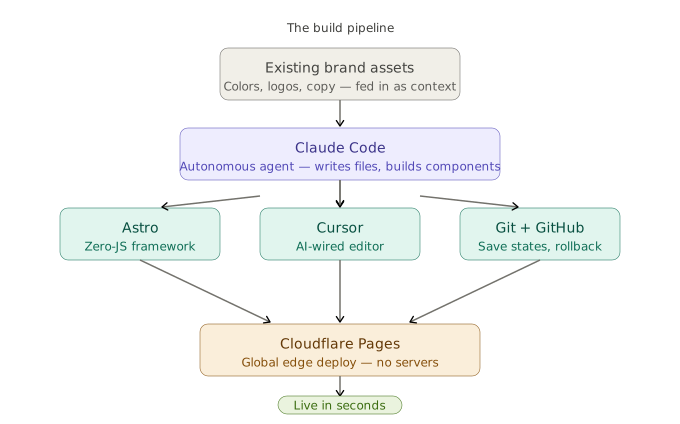
Five tools. Zero servers. Production-grade infrastructure for a local service business.
What This Actually Teaches You
Here’s the thing nobody talks about with AI-assisted development: it doesn’t just build faster. It forces you to learn systems architecture at a speed that’s impossible any other way.
When you build everything yourself, you understand every layer because you chose it. You picked the framework, configured the server, wrote the deployment script.
When AI builds it, you get handed a complete machine you didn’t assemble. And if you’re serious about operating it, you have to reverse-engineer your own infrastructure. That’s not a downside. That’s the fastest technical education available.
We didn’t need a CS degree for this. We needed three things: a clear problem, the stubbornness to let AI build something we didn’t fully understand yet, and the curiosity to dig in until we did.
Prompt. Observe. Understand. Redirect.
That’s the operating system for building with AI. You don’t need to write the code. You need to understand the machine well enough to tell it where to go.
And if you’d rather skip the learning curve and just have the machine built — that’s what we do.