What an Agentic Operator Does With a Messy CRM
Cleaning up a CRM isn't a button. It's reading the threads, fixing the tools that produce the mess, sending with safety architecture, and writing the rules down so the mess can't form again. The five moves of an agentic operator.
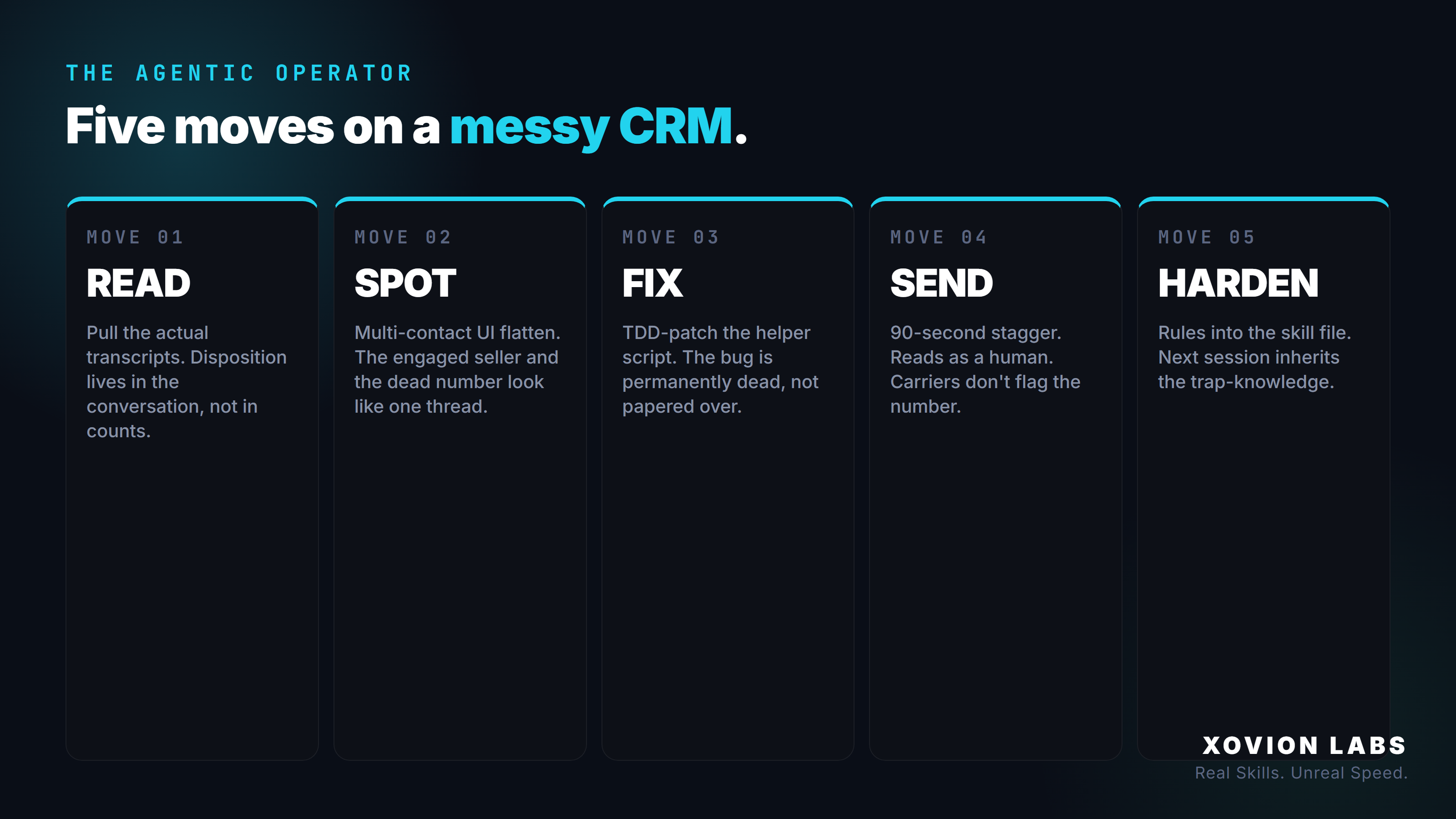
When people hear “AI cleaned up my CRM,” they picture a button. A bulk action. Every overdue task closed, every contact tagged, every sequence kicked off in one sweep.
That’s not what an agentic operator does. An agentic operator picks the CRM up, looks under it, and finds that the tool itself is part of what’s broken. Then it fixes the tool, drafts the real follow-ups, refuses to send them blindly, and writes the rules down so the same mess can’t form again.
Here’s what each of those moves actually looks like.
Read the threads, don’t count them
Most CRM cleanup tools count things. Overdue tasks. Days since last touch. Contacts with no email. Those numbers are real, but they’re not where the work is. The work is in the actual conversations.
A lead with eight messages saying “asking $450k, send me an offer” needs a phone call today. A lead with a polite “thanks, not interested” needs to be closed and suppressed. A lead that’s been “warm” for three weeks because the rep keeps pushing the task forward, but the contact has ghosted, is fooling everyone. None of that shows up in a count. It shows up in the transcript.
An agentic operator reads the transcripts. Hundreds of kilobytes of them, the same way a sales manager would if they had eight hours and a coffee. That’s the first move: pull the actual exchanges, rank them by what the seller actually said, and put them in three buckets — ready to sell, routine re-touch, and close out. The bucket is the disposition. The action follows from the bucket.
The trap that breaks naive automation
Then a thing that’s almost impossible to spot from the UI starts showing up in the data.
Most CRMs show you a single timeline per lead. They merge messages from every contact on that lead into one continuous stream. If a lead has two contacts — say, a husband and wife on a property, or a primary contact plus a stale skip-traced number that turned out to be a sibling — the UI shows you one conversation. It isn’t.
The contacts are independent. When an automation says “if this lead hasn’t been touched in 14 days, send a re-touch,” your CRM doesn’t actually pick the engaged human. It picks the contact marked “primary,” which is often the one with no signal: the wrong number, the second decision-maker who never replied, the opt-out. Meanwhile the contact who’s actually been talking with you gets nothing. From the operator’s seat, the timeline looks like the engaged seller is being aggressively spammed. From the API, it’s two separate threads, and the spam is being directed at someone who doesn’t matter.
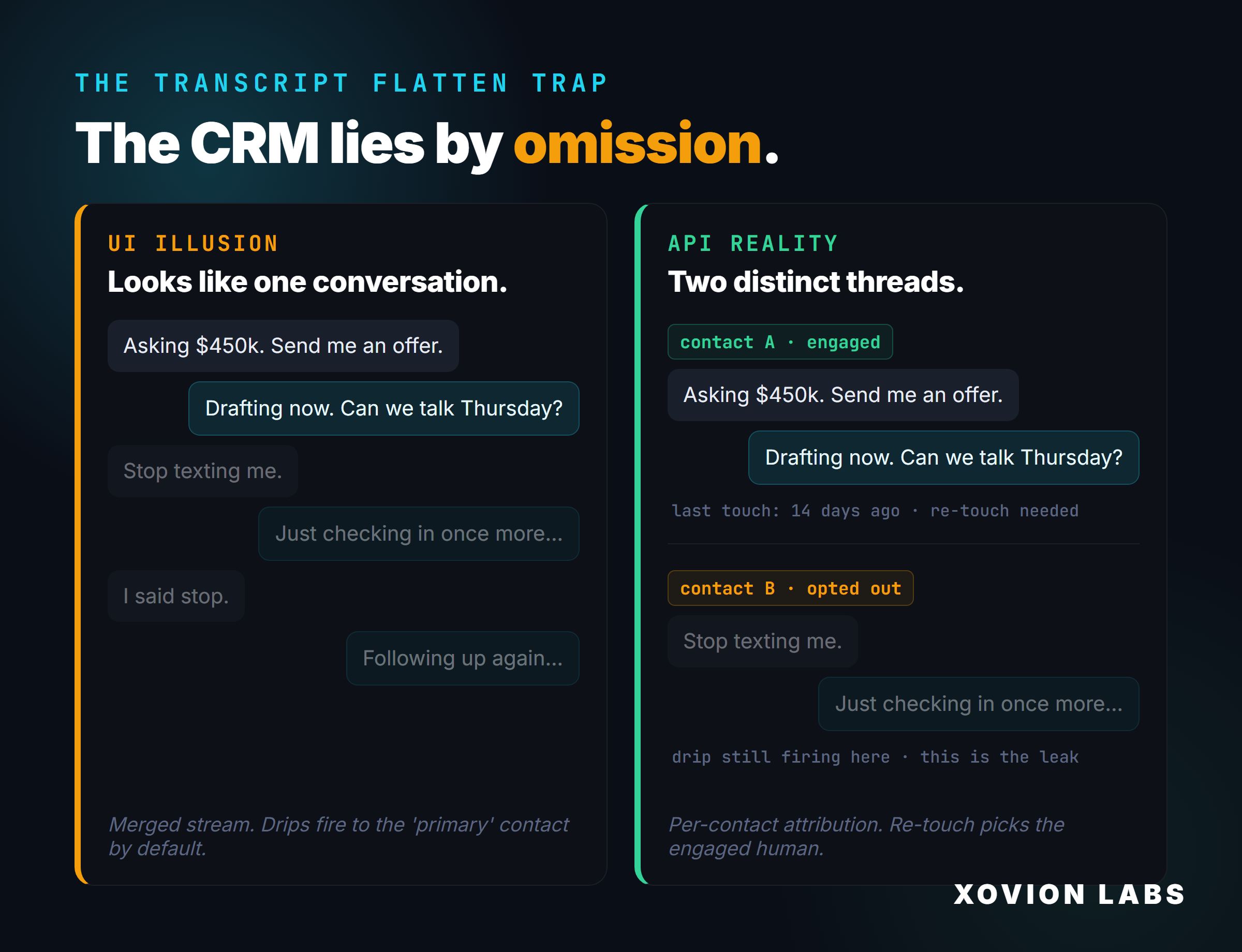
That gap between what the UI shows and what the API knows is where most automation quietly cools live deals. An agentic operator doesn’t trust the merged view. Every message gets attributed back to the contact it was actually sent to, before any automation decides where to send the next one.
When the tool is the bug, fix the tool
While reading the triage, another pattern surfaces: half the tasks created this week are assigned to the wrong person on the team. Not a data issue. A code bug.
The CRM helper script — the Python wrapper the operator uses to create tasks from the command line — calls the CRM’s task-create endpoint without explicitly passing an assigned_to field. The CRM then falls back to whatever default it picks, which isn’t the lead owner. Every new task drifts toward the wrong inbox, silently, until somebody notices days later.
A chatbot would say “I’m sorry, your tasks are being assigned to the wrong person. You should fix that in your settings.” An agentic operator opens the script, writes a failing test that asserts new tasks land on the right user, runs it (it fails for the right reason), adds the missing parameter, runs it again (it passes), commits the fix. The next call from anywhere — the morning brief, the triage script, an ad-hoc command — inherits the fix. The bug is permanently dead, not papered over with a one-time mass-reassign.
The general pattern: when the tool you’re using is the thing producing the mess, the move is to fix the tool, not work around it. Most operators don’t do this because their tools are SaaS they can’t edit. An agentic operator works inside scripts they own, so the tool is the thing they can edit.
Send slower than you think you need to
Now there are, say, several dozen real re-touches to send. Personalized to the specific conversation, not template spam. It would be tempting to fire them all at once.
Don’t. Two things will happen.
First, carriers will see a burst of texts from the same number in a few seconds and slam the brakes. Sometimes the burst is rejected outright with an error code. Worse, sometimes it goes through but quietly flags the number for high-volume commercial suspicion, which degrades deliverability for days or weeks. The operator never sees the flag. They just watch reply rates fall and assume the leads went cold.
Second, per-message errors compound. If one number has gone dead and the send fails, the script has to handle that, which it can do calmly, one message at a time. In a burst, errors cascade and the operator gets a wall of red they have to triage one by one.
The fix is architectural, not a setting in the CRM. The script wraps the CRM’s send call with a deliberate delay between messages — ninety seconds, in the case I keep seeing work — and the whole batch goes out at a human cadence. Carriers read it as a person texting, one message at a time, exactly like the operator would on their phone. Reply rates stay where they should, and any failure is isolated.
This is what an agentic operator means by production safety. It’s not a feature you turn on. It’s an architecture you put around the action.
A hard gate on irreversible mass writes
With the script fixed, the trap dodged, the stagger in place, the agent still won’t actually press send. It surfaces every drafted message to the operator first, side by side: names and addresses and the exact text it intends to send, and refuses to execute until the operator looks at them and explicitly says go.
This is the line between an agentic operator and a runaway script. Mass writes — bulk SMS, bulk lead creates, status changes across hundreds of records — go through a hard gate. The gate isn’t a UI prompt the operator can blow past on autopilot. It’s a refusal coded into the agent’s safety classifier: any action that touches a lot of records in a way that’s hard to undo is rejected by default. The operator can override it with an explicit command that names the action and the count, but they can’t drift into a thirty-five-message blast because they hit enter at the wrong time.
The phrase “you wouldn’t do this in your own business without looking” is the test. If a sane operator would pause and eyeball this before sending, the agent pauses too, and won’t proceed until the operator has actually eyeballed it. That’s not friction. That’s the only thing keeping autonomous tooling from breaking real production.
Write the rules down before the session ends
All of the above is wasted if next week the agent forgets.
So the final move, and the most underrated one, is to bake what just got learned into the agent’s permanent instructions. The fix to the script lives in git. The ninety-second stagger is the default in the send function, not an option. The rule that says “always check contact attribution on multi-contact leads before deciding a lead has been dripped” is written into the agent’s skill file. The next session inherits all of it — including, crucially, the traps the agent now knows to avoid.
This is the difference between a chat session and an operator. A chat session helps you once and forgets. An operator gets better each time it cleans up the same CRM, because each cleanup permanently changes the tools and the rules. The mess gets shallower every week instead of resetting every Monday.
What this actually means
“Cleaning up the CRM” sounds like a one-time chore. It isn’t. Every operator’s CRM degrades constantly: new leads land, new tasks accrue, contacts go stale, automations drift, partners get auto-assigned by accident.
The agentic move isn’t a one-time mass cleanup. It’s to install an operator inside your stack that keeps the CRM honest week after week. It reads what your reps are too busy to read. It fixes the tools you didn’t know were broken. It sends with the carrier-safe architecture you didn’t know you needed. It refuses to do anything irreversible without you in the loop. And it writes the rules down so the same mess can’t form again.
That last piece is the whole thing. Anything else is just automation that ran once.