When Your AI Stack Runs on Hardware You Actually Own
A developer's self-hosted server rack went viral with 32.9K views. Here is what that setup reveals about a quiet shift in how serious operators are thinking about AI infrastructure.
The Signal #037 — Dakota’s read on the AI news that actually matters to people running a business.
Most AI conversations start and end with software. Which model, which API, which tool. But a post that pulled 32.9K views last week was about none of that. It was a photo of a server rack.
That is worth a few minutes of your attention.
What happened
On June 23, 2026, Brad Traversy, a well-known developer educator, posted on X that he had finished building his homelab server rack. The post racked up 32.9K views and listed out exactly what was inside: a Sysracks enclosed cabinet, a TP-Link Omada 2.5G and 10G core switch, a 2U Intel Core Ultra 9 server running Docker and staging environments, a GMKTec EVO-X2 AI and automation box (what he calls the “Hermes box”), a Dell PowerEdge server running Proxmox (an open-source virtualization platform), a QNAP 8-bay NAS (network-attached storage, basically a box of hard drives your whole network can access) loaded with 8 drives at 8TB each in RAID 6 (a storage setup that can survive two drives failing without losing data), a Synology NAS during migration, dual APC UPS units (battery backups that keep everything running if the power cuts out), and AC Infinity rack cooling.
His description of what it all does: internal dev and staging services, local DNS (the system that translates domain names into network addresses), reverse proxy (a traffic router that sits in front of your servers), storage, backups, automation, and an AI agent stack. He called it “completely unnecessary” and “extremely satisfying.”
The number of views on a photo of network hardware says something.
Why it matters for operators
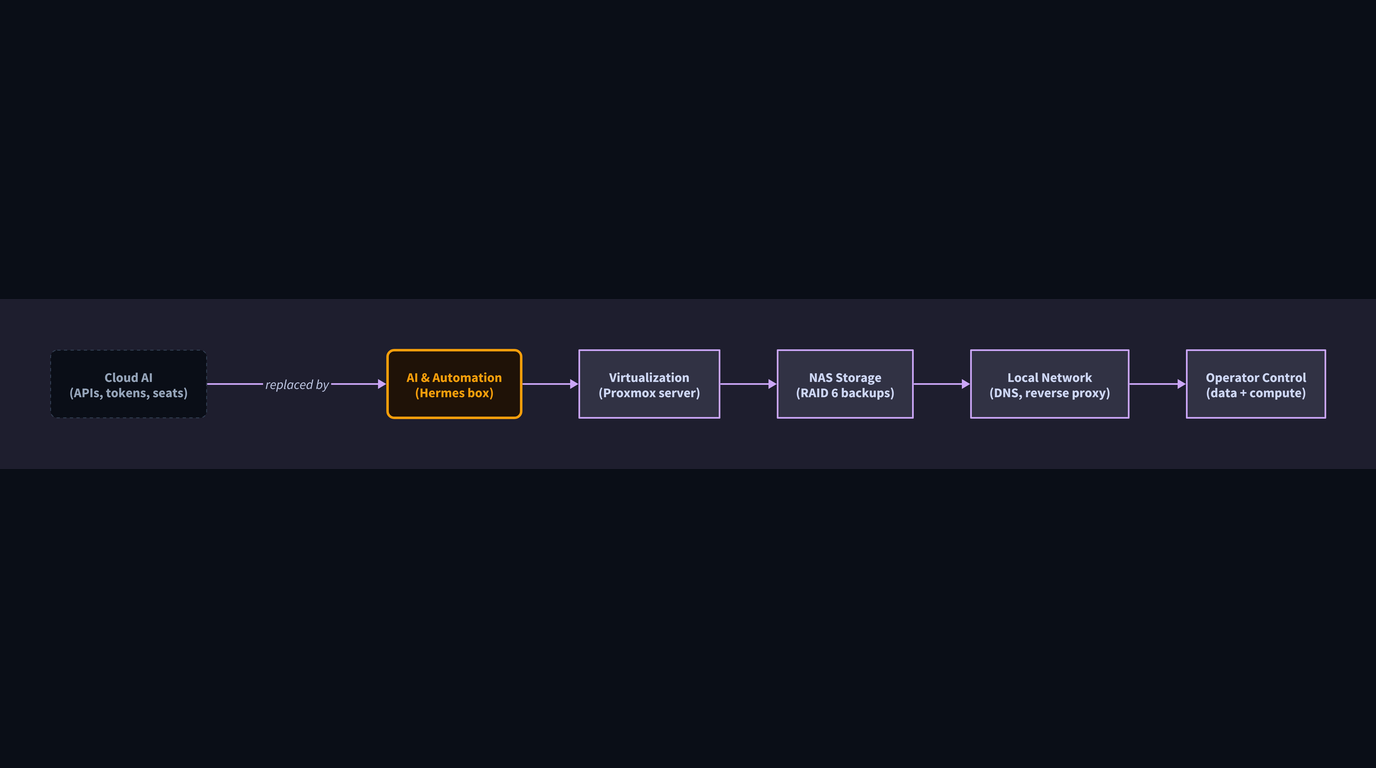
Most operators interact with AI through APIs (application programming interfaces, the connectors that let software talk to other software) and cloud subscriptions. You pay per call, per token (a small chunk of text the AI reads or writes), per seat. That model is fine for getting started. It starts to feel different when your usage scales, your data gets sensitive, or your costs become unpredictable.
What Traversy built is the physical alternative. His AI agent stack is not running on someone else’s server in a data center he has never seen. It runs on hardware in his space, on his network, under his control.
For a solo developer, that is a personal project. For an operator, the underlying logic is worth understanding.
A boutique wealth management firm, for example, handles client data that nobody wants sitting in a third-party cloud environment with fuzzy data residency terms. A manufacturing company running quality-control automation on proprietary process data has the same concern. Self-hosted AI (running models on your own hardware rather than through a cloud provider) puts the data, the compute, and the access controls all in one place you manage directly.
The specific hardware Traversy listed is not the point. The architecture is. One box for AI and automation workloads. One box for virtualization and learning. Separate storage, separate backups, separate power protection. Each layer has a job, and none of them depend on a vendor staying online.
What most people get wrong
The assumption is that self-hosted AI is for engineers with deep pockets and too much time. That assumption is getting harder to defend.
The GMKTec EVO-X2 that Traversy lists as his AI and automation box is a consumer-grade mini PC, not a data center appliance. Local AI models have gotten small enough to run on hardware that costs a few hundred dollars, not tens of thousands. Proxmox, the virtualization software running his Dell server, is open source. The QNAP NAS is a product you can buy from a regular reseller.
None of this requires a full-time infrastructure team. It requires someone who is willing to learn how the pieces fit together, and increasingly, AI tools are helping people do exactly that.
The other thing people get wrong is treating this as all-or-nothing. You do not have to replace your cloud subscriptions to think more carefully about where your AI workloads run. Some tasks belong in the cloud, fast and disposable. Some tasks, the ones touching sensitive data, running on predictable schedules, or requiring consistent uptime you control, are worth a harder look.
The question is not “should I build a server rack.” The question is “do I know which parts of my AI stack I actually own, and which parts I am just renting access to.”
The lesson
A viral photo of someone’s server rack is a signal about where a certain kind of serious operator is heading. Not away from AI, but toward a more deliberate relationship with the infrastructure underneath it. Cloud is convenient. Ownership is durable. The operators who will build the most resilient AI systems are probably thinking about both.
If you want to think through what your own AI infrastructure decisions actually look like, start at xovionlabs.com.