Insights
Operations
AI Inbox found the follow-up. Who owns it now?
Suggested to-dos help you notice the work. A source link, one owner, and a completion rule turn a suggestion into an accountable commitment.
The inbox looks organized. The important messages have summaries. The follow-ups are sitting in a neat list.
One customer is still waiting because everyone assumed someone else would handle the next step.
Finding the work and assigning the work are two different outcomes. AI can make the first one much easier without settling the second.
The inbox is getting better at noticing
Google’s October 15 AI Inbox announcement describes suggested to-dos extracted from email conversations and summaries of important topics. Google is expanding the feature to eligible paid Workspace users, with availability depending on edition, rollout, and language settings.
That is a useful discovery surface. It is not evidence that a particular follow-up has an accountable owner in your team’s execution system.
The distinction matters most when the owner reads the summary and assumes the team now has the task.
Turn the suggestion into a commitment
Imagine a hypothetical service business receiving an email that asks for a revised quote by Friday. The message includes useful context, a previous attachment, and a tentative promise from someone on the team.
An extracted to-do might say “send revised quote.” Before it becomes active work, someone needs to resolve the actual commitment: which quote, which version, who is preparing it, and when the customer expects it.
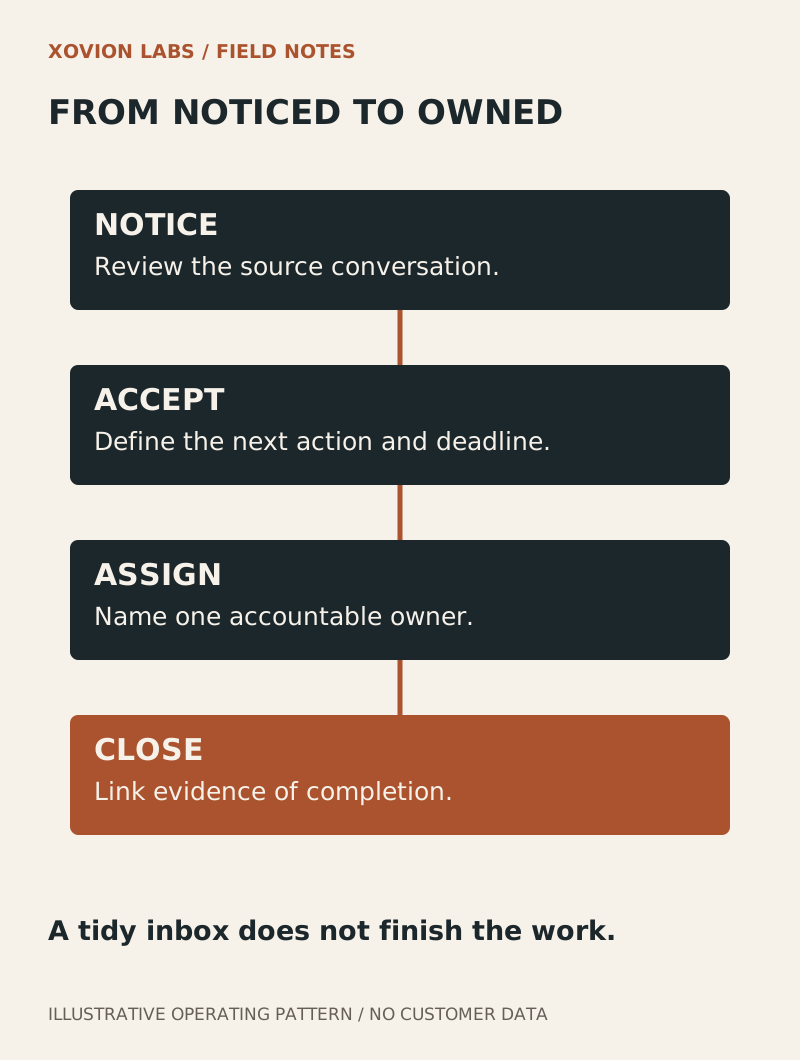
A good task should let the next person begin without rereading a week of email. Keep a link to the source conversation, state the next action, name one owner, and define what closes the task.
| Inbox observation | Execution decision |
|---|---|
| A deadline appears in a message | Confirm the deadline and relevant timezone |
| A reply is probably needed | Decide who is accountable for that reply |
| A quote is attached | Identify the version that needs revision |
| A topic looks important | Decide whether it belongs in the active queue |
Do not turn every notification into an owner’s task. A delivery receipt, an automated status update, and a customer request are different kinds of information. Some should update a record; some need a person; some only need retention under the team’s normal rules.
Keep one active place for the commitment
If the same follow-up lives in the inbox, a personal checklist, and the team’s task system, decide which place controls status. The others can point to it.
Otherwise, one person may check off a suggestion while another still sees an open task. Or an old reminder may recreate work the team already completed.
Use stable source references when connecting suggestions to tasks. Before creating another item, check whether that commitment already exists. A new message in the same thread may update the deadline or answer the question rather than create a second job.
An archive action should also have a clear meaning. It can mean the email was reviewed and routed. It should not silently mean the customer received the promised answer.
Audit a small set of threads
Choose a bounded set of recent conversations your team is authorized to review. Independently identify the real commitments, then compare them with the AI suggestions and the active task queue.
Look for missing work, duplicate tasks, incorrect deadlines, and tasks that lack an owner. Also count suggestions that correctly required no task. That prevents a system from looking successful merely because it created more reminders.
The exercise passes when another team member can locate each accepted commitment, identify who owns it, and see the evidence that it was completed or consciously declined.
No auto-send is needed for this first test. You are checking whether noticing has become accountable execution.
Make the handoff visible
Start with one recurring inbox category, such as quote revisions. Decide what becomes a task and what belongs elsewhere. Then make the owner and completion rule visible at the moment you accept the work.
For what happens after intake, read Trace the missing handoff before buying another dashboard. An excellent summary is useful. A customer needs the next step to happen.
Source and scope
Google Workspace: Gmail’s AI Inbox rollout, October 15, 2026. Feature and availability statements follow Google’s announcement. The quote example and audit are illustrative recommendations, not a claim that AI Inbox automatically creates or completes tasks in another application.