Property Management
Your software holds the records. Your team needs the next step.
One workspace for the work spread across leasing, maintenance, and accounting tools.
Explore the app.
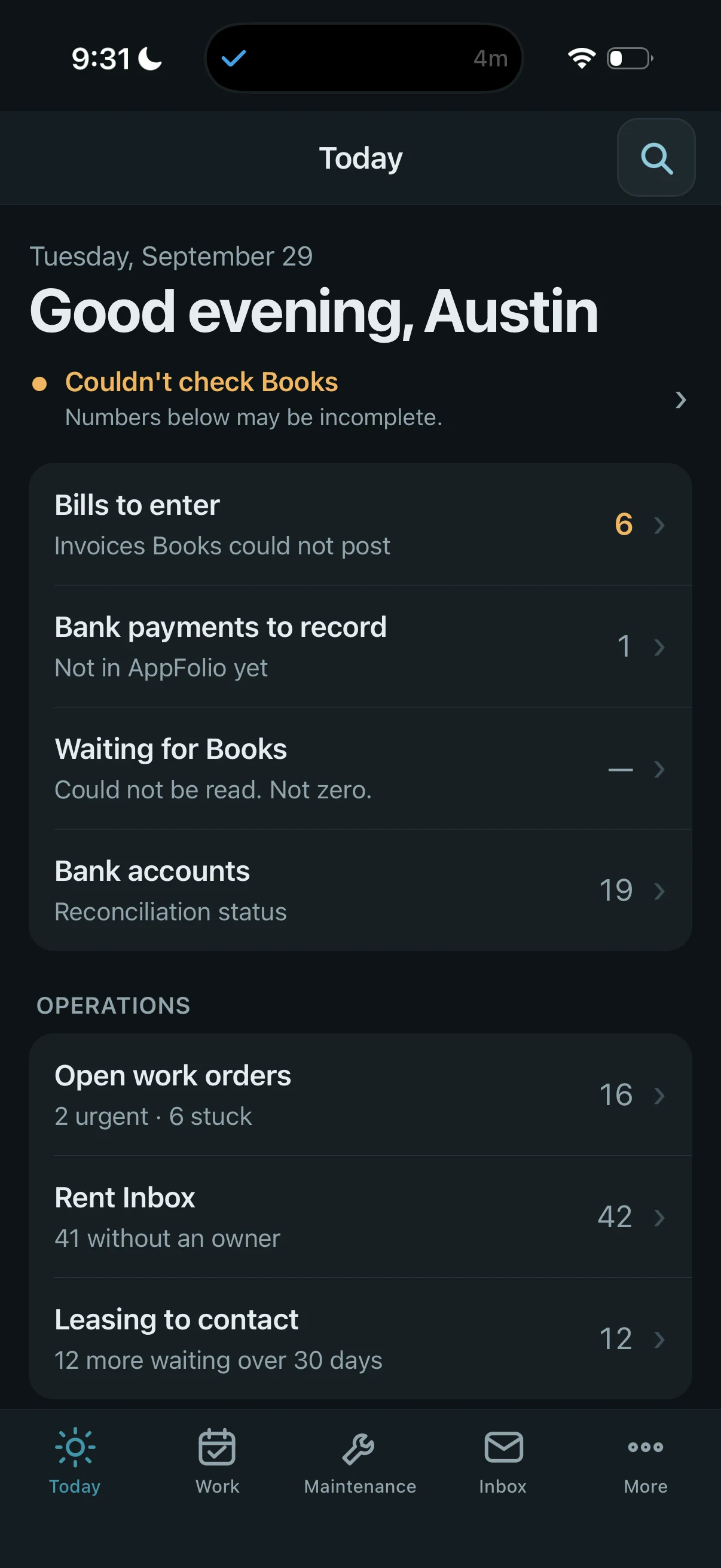
Today: what needs my attention?
Accounting, maintenance, inbox, and leasing queues in one daily view. When Books cannot be checked, the screen says the numbers may be incomplete.
Explore screenshot : Today: what needs my attention?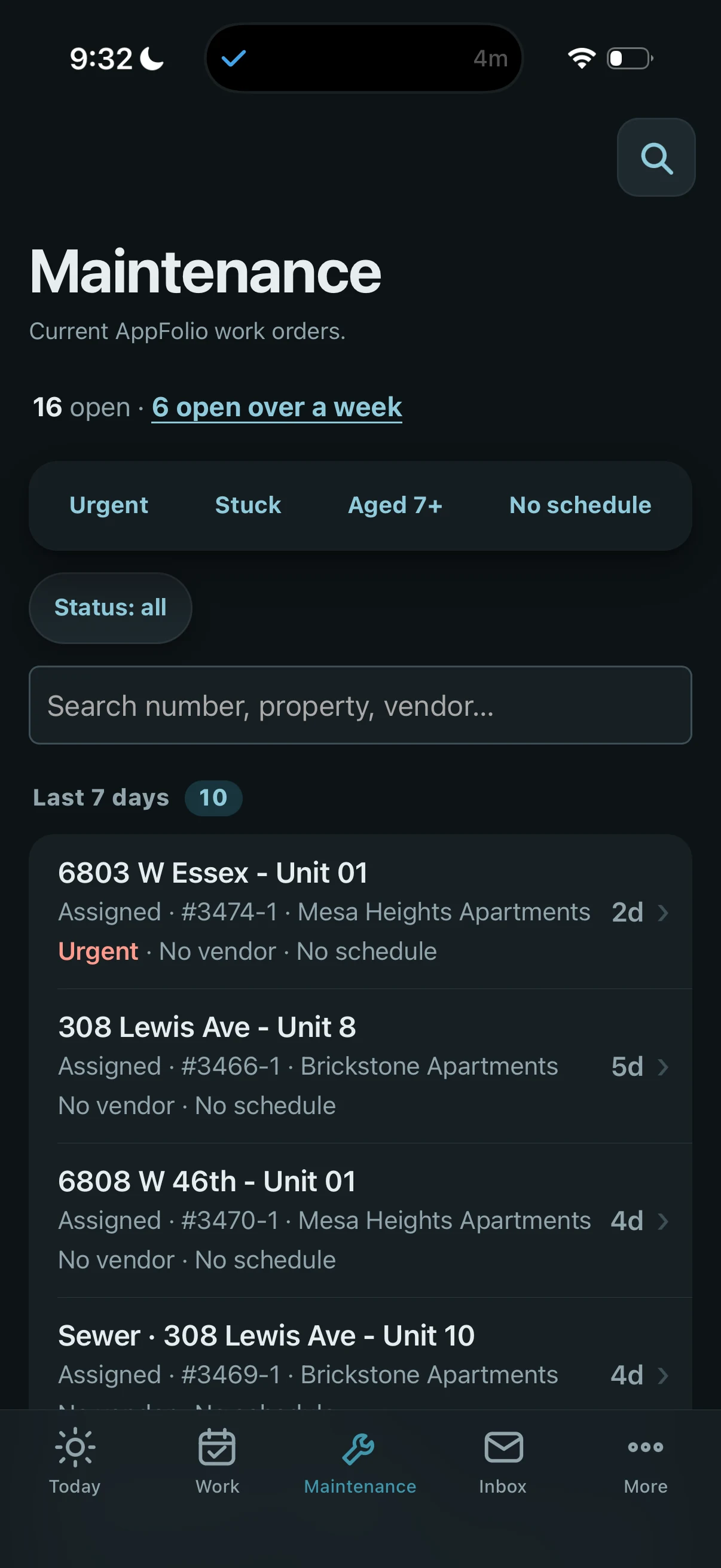
Maintenance: which repairs need follow-up?
Urgent, stuck, aged, and unscheduled work can be found from the maintenance queue, alongside property, assignment, and age information.
Explore screenshot : Maintenance: which repairs need follow-up?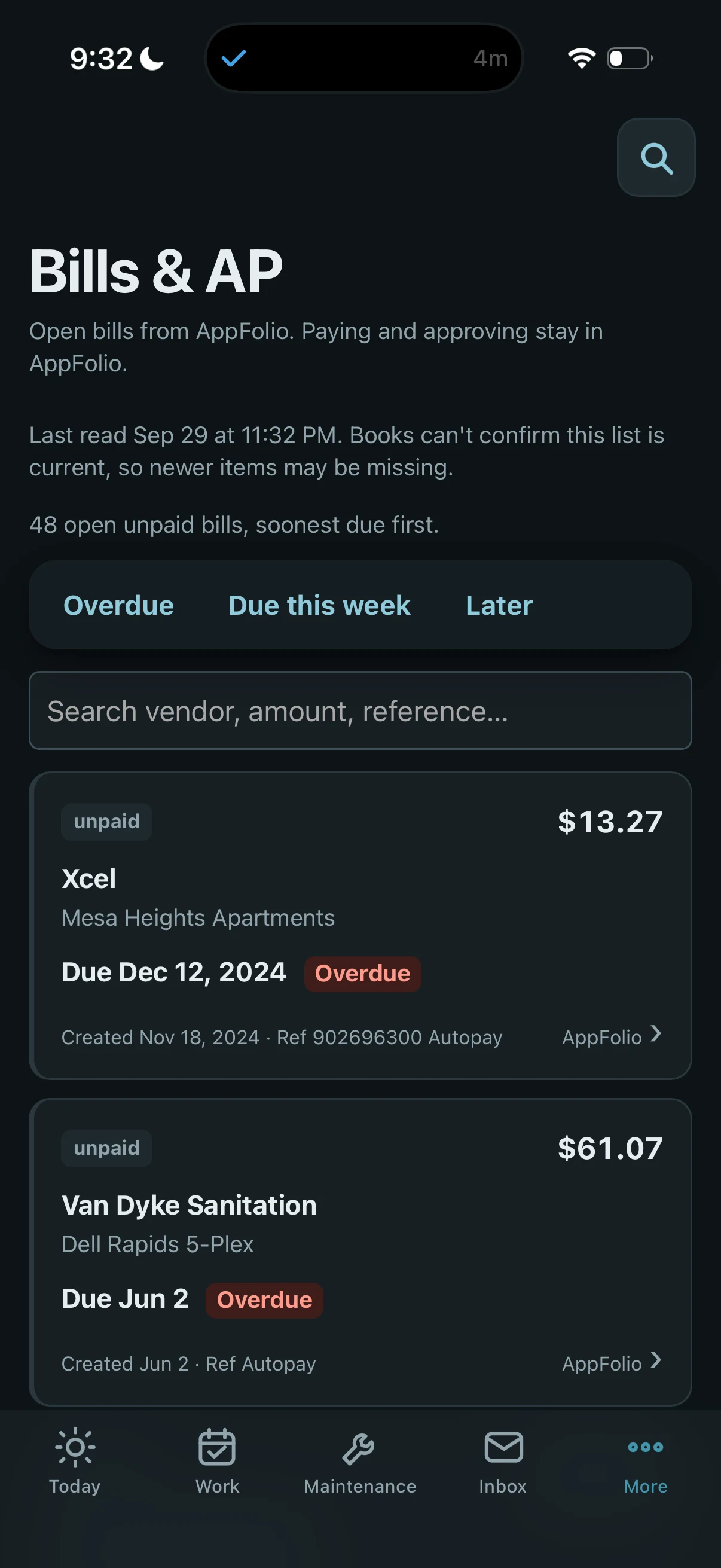
Bills & AP: what needs review?
Unpaid bills are grouped by due date. The screen identifies the last source read and warns when the list cannot be confirmed current. Paying and approving stay in AppFolio.
Explore screenshot : Bills & AP: what needs review?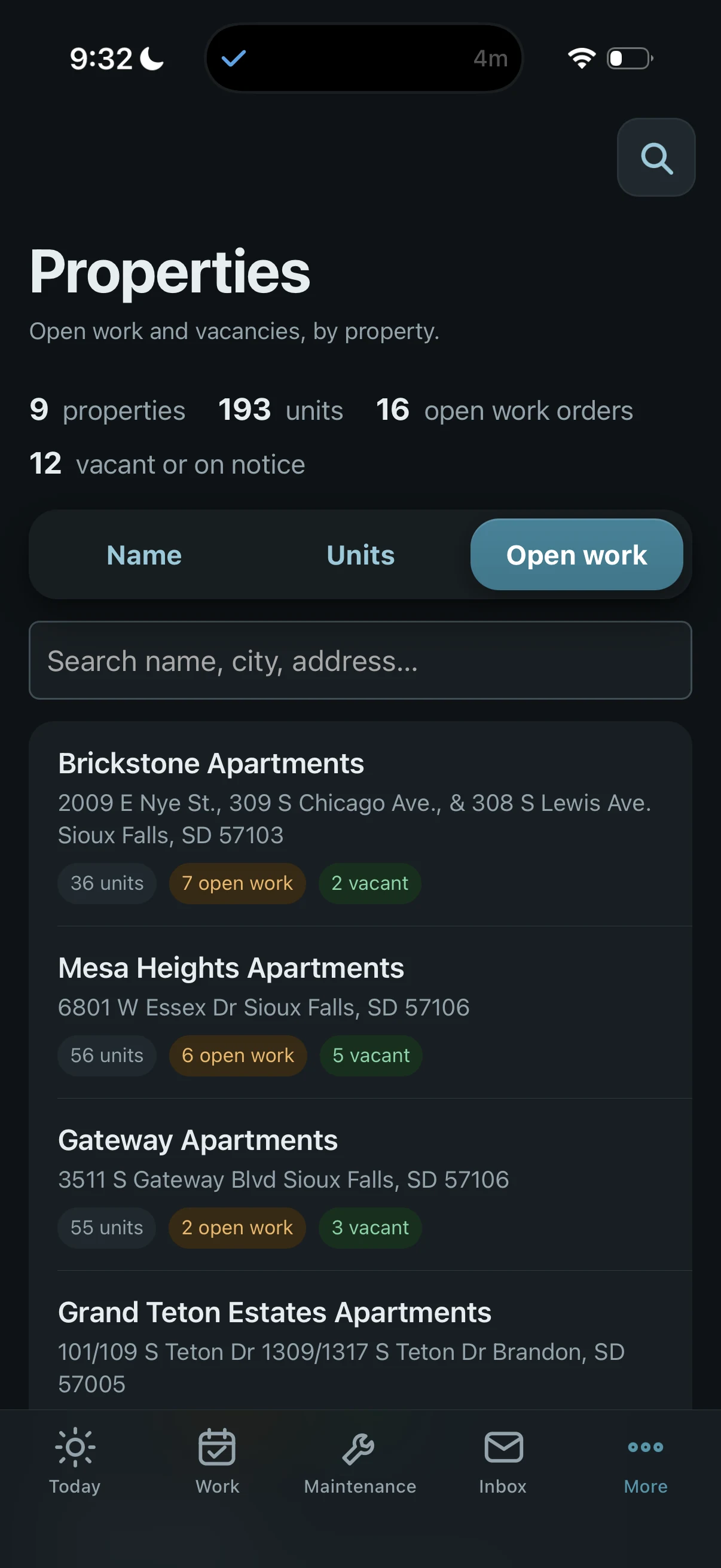
Properties: where is the work piling up?
The open-work sort brings properties with more outstanding work to the top, with unit and vacancy context alongside each property.
Explore screenshot : Properties: where is the work piling up?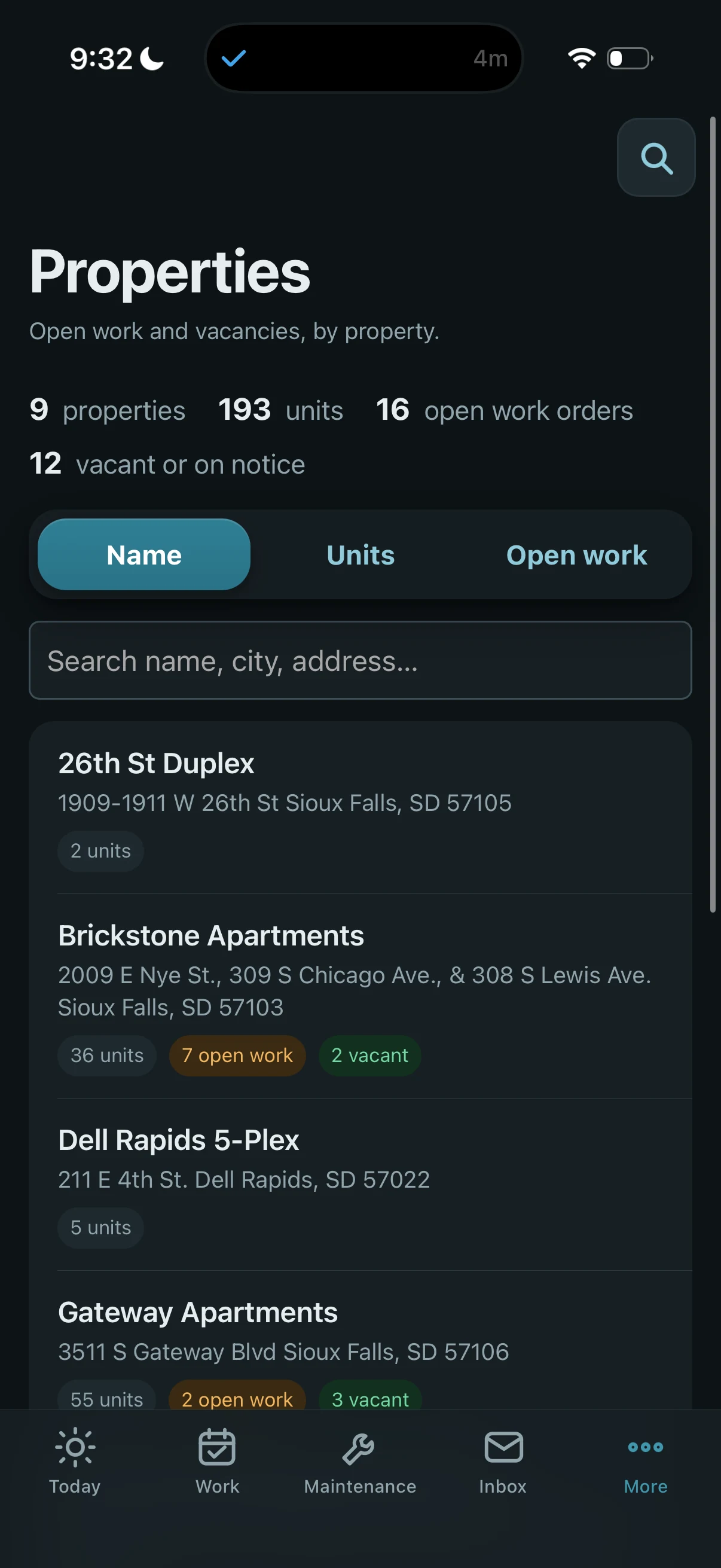
Properties: find a known property
The same property view sorted alphabetically, with search available for a name, city, or address.
Explore screenshot : Properties: find a known propertyCaptured app screens, not a live feed. Counts and source states reflect the moment shown.
Follow the work.
An illustrative operator walkthrough using captured app screens.
01 Find what needs attention
Start with the daily queues. A source warning means the accounting picture may be incomplete.
Select the image to inspect the full screen ↗02 Inspect the stalled repair
Use urgency and age to narrow the work. Check the vendor and schedule recorded in this view.
Select the image to inspect the full screen ↗03 See the property context
Sort by open work to see where more tasks are waiting, alongside units and vacancies.
Select the image to inspect the full screen ↗04 Review at the source
Check when the bill list was last read. Payment and approval stay in AppFolio.
Select the image to inspect the full screen ↗
These views show how to inspect the work and its evidence. They do not demonstrate a completed action or measured result.
SYSTEM SHAPE
Shared context. Different jobs.
Each role gets a view of the same operation shaped around its responsibilities. The original systems keep their records, permissions determine available actions, and missing information stays visibly unknown.
Source systems
Source reads, with freshness and availability
Shared operational context
Property, person, work, and source information brought together for the operating layer.
Role and capability determine the workspace
Operator workspaces
AppFolio remains the place to pay and approve the bills shown. Xovion Books is a separate accounting automation system; its warnings appear in the captured app views. Neither a missing count nor an unconfirmed result should be treated as a healthy zero.
Architecture context: the role-based product note and the original build chapter. This diagram shows system relationships, not a live health check.
Read the build story and evidence
Where it is now
The screenshots above show the current mobile interface: a daily attention queue, maintenance work, bills and accounts payable, and property browsing. They are captured views, with the source warnings and incomplete-data states left visible.
The system started as a data-ownership problem: collect the operational record from every tool into one place the team could actually query. That foundation now supports a product organized around the people doing the work.
The current system is organized around operator roles rather than source systems or database tables. Leasing, maintenance, accounting, and admin share the same underlying operation, but each sees the work, evidence, and next actions that matter to that role.
The warehouse became infrastructure. The operating layer became the product.
Follow one operator through the screens
Hypothetical walkthrough: an operator opens the app before visiting a property. This illustrates how to read the supplied screens; it is not a claim about a measured outcome.
- Start with Today. The operator sees several queues, but also sees that Books could not be checked. That warning changes how the accounting section should be interpreted: incomplete evidence is a reason to investigate, not a clean bill of health.
- Narrow the maintenance work. Urgent, stuck, aged, and unscheduled filters help find the work to inspect. A row with no vendor or schedule shows that neither is recorded in this view. It does not establish why the repair stalled or promise that the app can dispatch someone automatically.
- Put the issue in property context. Sorting properties by open work surfaces where more work is waiting; sorting by name makes a known property easier to find. The operator can see the property context without treating a work-order count as a measure of repair quality.
- Review bills at their source. Bills & AP shows due-date groupings and AppFolio links. The last-read warning matters before any accounting decision: newer items may be missing, and paying or approving stays in AppFolio.
The useful sequence is find the work → inspect its evidence → choose a permitted next action. A screenshot can demonstrate the interface. It cannot prove the downstream action happened.
The problem
Every property manager knows this shape: your property management software is where the leases, rent rolls, work orders, and tenant contacts live. But it’s not where the work actually happens.
- Leasing calls come in on the phone.
- Maintenance requests trickle in over text.
- Rent questions land in a shared email inbox nobody has time to fully triage.
- Tasks and follow-ups live on a board that doesn’t know anything about the ledger.
- When your partner asks “how did we do this week?” — you’re opening four tools, cross-referencing PDFs, and half-guessing.
The software has the record. The team is flying blind between one weekly export and the next.
There’s a deeper version of this problem, though, and it’s the one that actually matters. Each of those tools only shows you your own data the way that software decided to show it. You can run the reports the vendor built. You cannot ask a question the vendor didn’t anticipate. Want to know which units generate the most after-hours calls per dollar of rent? That report doesn’t exist, and it never will, because no vendor is going to build it for you.
You don’t have a reporting problem. You have an ownership problem.
The approach
Bring the operational records into a shared context layer the team can query.
AppFolio records, communications, task state, and other operational sources contribute different pieces of the same work. The independent data layer makes those pieces available together instead of asking an operator to reconstruct the context in every source tool.
Source reads do not all happen at the same time. A screen needs to distinguish a current result, a previously read result, and an unavailable source. The app’s visible warnings are part of that boundary, not incidental error text.
The original build chapter describes the earlier data, dashboard, action, and AI layers. The newer product note describes the shift toward role-specific workspaces. Those chapters document the progression; their old counts and implementation plans should not be read as a current inventory of capabilities.
What we built
The current operating layer sits on top of the same shared data foundation and turns it into role-specific workspaces:
- Leasing sees leads, people, units, follow-up, and the rent inbox.
- Maintenance sees work orders, urgency, overdue items, and closeout.
- Accounting sees bills, banking, transactions, month-end work, and vendors.
- Admin can move across the full operation.
The original infrastructure underneath it is still the reason those workspaces can agree on context.
The foundation
The system still depends on an independent operational data layer beneath the interface. That layer brings together the records needed to reason across leasing, maintenance, accounting, communications, and task state without forcing each operator to live inside every source system.
What matters publicly is not the size of that warehouse. It is what the operating layer can safely do with the context:
- Role-specific workspaces. The same underlying operation presents different work to leasing, maintenance, accounting, and admin.
- Capability-gated actions. The interface only exposes actions a role is allowed to take.
- Source honesty. Missing or unreadable data is shown as unknown, not quietly converted into a healthy-looking zero.
- Outcome-aware writes. If a write was sent but the result cannot be confirmed, the operator sees an explicit “not confirmed” state and is told to refresh before trying again.
- Mobile-first prioritization. The phone experience is built around what needs attention and what can safely happen next, not around exposing the underlying database.
- No convenience shadow state. The application stays a thin operating layer over the real source systems rather than inventing a second task or accounting truth just to make the UI easier to build.
What the screens establish—and what they do not
Visible in the supplied captures: daily queues, maintenance filters and search, bill due-date groupings, property sorting, and explicit source-availability warnings. The Bills & AP screen also states where payment and approval happen.
Described by the build and product notes: role-specific workspaces, capability-gated actions, and handling of unconfirmed writes. A screenshot of a queue does not independently demonstrate enforcement of permissions or a successful write. Those need implementation and outcome evidence.
Not established here: quantified time savings, improved collection or repair rates, or guaranteed freshness across every connected source. No such result is inferred from the displayed counts.
For an operator considering a similar system, the practical test is small: take one real task, check its source, try the permitted action, and verify the result in the system that owns it. Include an unavailable-source case and an unconfirmed-action case before expanding the workflow.
What changed as the system matured
The original build was mostly about owning enough operational context to ask better questions.
The newer work is about turning that context into a dependable daily workspace.
That changed the design standard. A useful internal system cannot stop at “the data is available.” It has to answer:
- What needs attention for this person?
- Which source supports that answer?
- What action is this role allowed to take?
- What happens when a source is stale or unreadable?
- What does the interface say when a write may have happened but cannot yet be verified?
Those questions are now part of the product, not cleanup work after the product.
The lesson
The individual features aren’t the interesting part. Any competent developer can build a dashboard.
The interesting part is that shared context becomes reusable infrastructure. Renewal work, delinquency review, maintenance follow-up, accounting workflows, and other operator tools can rely on the same evidence layer instead of rebuilding their own version of the business each time. Separate systems such as Xovion Books can use that context without turning the Property Operations System into the accounting source of truth.
If you’re a property manager who feels like your team is flying blind between exports, the highest-leverage move isn’t a prettier report. It’s owning the place where every tool’s data lands, so the next question you think of is one you can actually answer.
That’s the receipt. The rest is just what you choose to bolt on next.
FROM BUILD TO NEXT STEP